My NixOS homelab setup
A teenage dream of mine has been to have my own homeserver, and well, write about it. So here I am fulfilling my dream.
It is not "done", it will be forever in continuous improvement and do expect updates.
Hardware setup
Years ago I was using a Raspberry Pi 3B+ and running nextcloud pi on it, it was not really usable, but still fun to play with.
Now I repurposed my old laptop as home server, and compared to running Nextcloud on a Raspberry Pi, it feels overkill, almost a waste.
Its specs are:
- Intel Core i7-8550U
- 16 GB of ram (Sam Altman leave me alone)
- It has an integrated GPU, an Intel UHD 620
- and a discrete AMD Radeon R7 M340, which so far, I have lacked an use for
- a ssd of 128 gb (holding the OS)
- a hdd of 1 tb (holding data)
Both disks are internal and connected to the motherboard with SATA.
I am not overly concerned about reliability (yet), as I do not keep anything which is sensitive or which I need to rely on the homeserver (yet). If the power goes out, as happened a few days ago, well I need to restart it, and I am fine with it for now.
I probably could insert the battery of the laptop as a "UPS", but I am rather concerned that it could catch fire, doesn't matter the low likelihood, the risk is not something I am willing to put up with. As a side-note, yes, also the laptop could catch fire, but I would consider that risk to be much smaller than the one associated with a battery.
Location
I would usually not include such a detail, but the location is really just a "match made in heaven": Next to where I have my router, there is a radiator which is never turned on, and the laptop slides perfectly in between the rods. Easy access to both power and networking.

Power
I am not measuring power continuously yet, so treat these numbers as a heuristic and not as a scientific measure. When idle, the system draw around 2 watts (the number we care about), and the CPU spec allows it to go up to something around 25 watts busy. 2 watts when idle, I do treat as very acceptable.
Additionally, I undervolted the CPU and have enabled powertop autotune. More on it later.
NixOS - yet another NixOS glaze
I have "hinted" to it in my previous post, that my server runs on NixOS. I got convinced by my friends who delivered more than one Ted Talk, illustrating how amazing NixOS is. And I concur, it truly is amazing.
I did not find the learning curve to be as steep as many say it is, I found it easier than installing arch (and or managing arch) by a long shot (not that it is inherently particularly hard). Admittedly, I am not using nix to the full extend it can be used, for instance I am not really using flakes yet, nor does my configuration have overrides or custom packages.
The convenience of NixOS is incredible. The same previous blog post showcases the utility of NixOS quite clearly.
The usual picture, on traditional systems, is the following (and the one I have experienced personally and professionally):
- There are multiple different configuration files scattered in the filesystem
- Every service has its own configuration conventions and or language
- Service files have to be managed independently of the package / service itself
- The firewall has to be configured, on top, on a per service basis
- Many packages / services require "hacks" to work as intended, which one might do and forget, making setting up a second machine with the same service, a harder endeavor.
- If things break, they are broken.
NixOS takes care of all the annoyances mentioned above. Everything is managed and configured inside your nix configuration.
If I or an update breaks something, it is trivial to rollback. Switching machines entails in copying your configuration and running nixos-rebuild switch and your setup is replicated.
While NixOS has it's issue, both technical and around governance/community, I do think it is setting the general direction of operating systems for the future, at least for what Linux is concerned.
Services
- Beszel for system monitoring. Although it is a great piece of software I am still on the search for something different. I really liked netdata before the whole cloud thing.
- Calibre One of the services which are not fully declarative. Wrote a short guide on how I got it to work here.
- Navidrome for music.
- The whole arr suite and Jellyfin. Enough said about that.
- Forgejo although making little use of it right now.
- Linkwarden as a bookmark manager. The website scared me into believing it would be very heavyweight, which it is comparatively, but absolutely manageable (as of time of writing it is using ≈ 700mb).
- Paperless to manage bureaucracy.
- Mumble-server for low latency VoIP calls (I love that piece of software). Testing my setup even led to my first bug fix in a open-source project, even if just a two loc change.
- As homepage I just use a static HTML file served from lighttpd. I perceived homepage software to be too bloated for my setup.
- Qbittorrent → see below
- Wireguard → see below
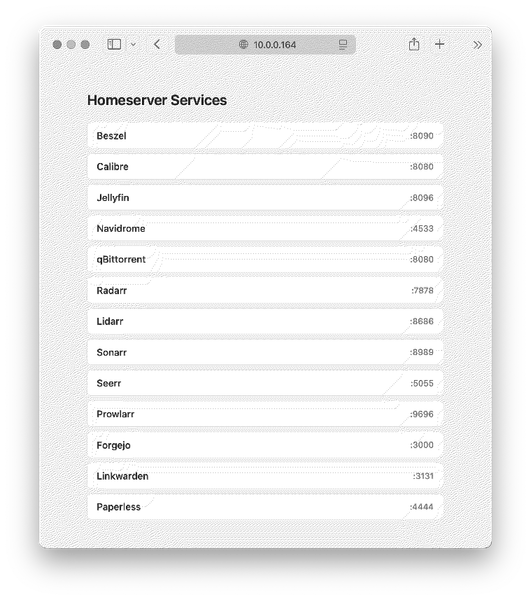
I won't go over the setup of each service, as many did not require anything which strays from standard NixOS options / configuration. I only describe those which are of interest (to the only reader, me).
qBittorrent and split tunneling
As I prefer having my p2p traffic behind a VPN, but not the rest of my traffic I wanted to set up split tunnelling, which turned out to be one of the hardest parts of the setup and I am still not fully satisfied. The reason why I am not fully satisfied that systemd-resolved does not support per interface DNS routing without network name-spacing, a thing to which I have not come yet. Meaning that DNS would leak from my VPN connection. For now I am using secure DNS server, that if leaked, don't reveal much about anything, but the setup is not ideal. Luckily the traffic going through the VPN doesn't require much DNS at all.
I manage all my networking trough systemd.network. To enable it system-wide set networking.useNetworkd = true;. To have a split tunneled VPN, I created a new netdev (virtual network) device and populate it with the config received from my VPN provider, then I configure this new interface to route all the traffic coming from the qbittorrent user through it. Inside the qBittorrent config I bind it both to the VPN's IP address and the interface, meaning if the VPN interface goes down, no traffic (is supposed) to leak.
A maybe better config would be using nixos-containers, putting the qbittorrent service inside, and then routing the container traffic through the vpn, or how I did previously, create a virtual machine which its sole purpose is to run qbittorrent and then have a shared directory. There is microvm.nix for instance which would suit a setup like this well. I consider the 1 - 3% performance loss to be negligible for a service being idle most of the time.
Below the config. I provide it in full, because it took me much longer than I would like to admit to figure it out.
{
  systemd.network.netdevs.wg0 = {
    netdevConfig = {
      Kind = "wireguard";
      Name = "wg0";
      MTUBytes = 1320;
    };

    wireguardConfig = {
      PrivateKeyFile = "/etc/wireguard/wg0-private.key";
      RouteTable = 51820;
    };

    wireguardPeers = [
      {
        PublicKey = "";
        PresharedKeyFile = "/etc/wireguard/wg0-preshared.key";
        Endpoint = "";
        AllowedIPs = [
          "0.0.0.0/0"
          "::/0"
        ];
        PersistentKeepalive = 15;
      }
    ];
  };

  systemd.network.networks.wg0 = {
    matchConfig.Name = "wg0";

    address = [
      ""
      ""
    ];

    networkConfig = {
      BindCarrier = [ "eno1" ];
      DNS = [
        ""
        ""
      ];
    };

    routingPolicyRules = [
      {
        Table = "main";
        User = "qbittorrent";
        SuppressPrefixLength = 0;
        Priority = 30000;
        Family = "both";
      }
      {
        Table = 51820;
        User = "qbittorrent";
        Priority = 30001;
        Family = "both";
      }
    ];
  };
}
Wireguard - accessing my homeserver from outside
The hassle and risk of opening up my homelab to the internet is not worth it for me; especially in this day and age. Hence, the only service I expose is wireguard, making it possible to securely access my homeserver from 🌟 anywhere in the world 🌟. I am fine with this risk, as wireguard's attack surface is very small, generally difficult to enumerate in automatic scans and if there is a wireguard CVE in the wild, much smarter persons than me will be rushing to fix it and there will be much more interesting targets at than me.
For now I manage my keys manually, I might write a short utility that helps me automate it.
On MacOS, for instance, wireguard supports on-demand-vpn out of the box. Wherever I sit, I can ssh 10.0.0.164 and find myself with a shell inside my server. It is incredible convenient and works flawlessly. In the same spirit I can just open Jellyfin and watch a movie wherever I find myself at.
One could rely on services such as tailscale to be able to have a VPN to ones homeserver without needing to open ports, but I'd rather not rely on a external service (if I can avoid it), especially in a setup as mine. I feel like, it would defeat the purpose of having everything self-hosted when then one requires the benevolence of a free plan to access its own server. One could use the OSS alternative headscale, but in a similar vein, I do not want to pay for a small VPS either.
I might consider to add tailscale as a backup access method in the future.
Note, the port needs to be forwarded in your router as well.
Dynamic DNS
As I do not have a static ipv4 address (yet), I use duckdns as a dynamic DNS provider; there are alternatives, but I also used them years ago and the experience was pleasant. After creating an account and receiving the token, to set it up correctly NixOS required 4 loc. The DDNS entry is then used by wireguard to resolve to my homelab.
services.duckdns = {
  enable = true;
  domains = [ "my-domain" ];
  tokenFile = "/etc/ddns/token";
};
File system set up
The SSD holds the operating system, while I use the HDD as media archival. The SSD is formatted as ext4, while the HDD is formatted as btrfs. If the team behind fedora conisders btrfs to be mature enough for production use, I trust their judgement.
One needs to specify the disk for it to be automatically mounted, and I enabled auto scrubbing.
fileSystems."/mnt/data" = {
  device = "/dev/disk/by-label/data-disk";
  fsType = "btrfs";
  options = [
    "compress=zstd"
  ];
};
services.btrfs.autoScrub = {
  enable = true;
  interval = "monthly";
  fileSystems = [ "/mnt/data" ];
};
Jellyfin
A throughly amazing media player. I am always astonished by open source software. This is the config that enabled hardware decoding for me. I am still not truly sure how or why this combination of settings works. Software truly is magic-like.
services.jellyfin = {
  enable = true;
  openFirewall = true;
};

environment.sessionVariables = {
  LIBVA_DRIVER_NAME = "iHD";
};

systemd.services.jellyfin.environment.LIBVA_DRIVER_NAME = "iHD";

users.users.jellyfin.extraGroups = [ "video" "render"];

boot.kernelParams = [ "i915.enable_guc=2" ]

hardware.graphics = {
  enable = true;
  extraPackages = with pkgs; [ intel-ocl intel-media-driver intel-compute-runtime];
};
Power and laptop specific setup
Firstly, the laptop has to work with its lid closed
services.logind = {
  settings.Login = {
    HandleLidSwitch = "ignore";
    HandleLidSwitchExternalPower = "ignore";
    HandleLidSwitchDocked = "ignore";
  };
};
Then I undervolted it. I decreased the voltage until it crashed. I tested it with s-tui.
services.undervolt = {
  enable = true;
  coreOffset = -100;
  uncoreOffset = -100;
  gpuOffset = -40;
  analogioOffset = null;
};
To have powertop apply autotuning automatically
powerManagement.powertop.enable = true;I did not create a swap partition or a swap file, but enabled zram zramSwap.enable = true
As I do have no need for wireless networking, and it can be considered hardening, I disabled wireless networking. For good measure, I also blacklisted the kernel modules.
hardware.bluetooth.enable = false;
networking.wireless.enable = false;

boot.blacklistedKernelModules = ["iwlwifi" "bluetooth"];
Additionally I disabled rfkill-service, as there is no need for it if networking is disabled
systemd.services = {
  "systemd-rfkill@".enable = false;
  "systemd-rfkill".enable = false;
};
I experienced this weird bug, in which on a reboot, the system would shutdown correctly, but not turn back on. I fixed it with.
boot.kernelParams = ["reboot=cold"];Hardening
Security hardening is perfect optionality (and I find it very fun): There are almost no downsides (potentially some performance and usability) but a lot of potential upsides (of not getting pwned).
While I hardened it to paranoia for a few weeks, I relaxed some security, as I conducted a more realistic assessment of which settings I can gain an advantage from and which were overkill.
Not every option I set will be covered.
The current setup is as follows
- blacklisted unused kernel modules
- prevent replacing the running kernel image and loading of kernel modules at runtime
- some more kernel hardening
- restricted who can connect to the nix-daemon
- your routine SSH hardening
- "comprehensive-ish" systemd hardening and disabling of everything not needed
As reference I mostly used
- https://xeiaso.net/blog/paranoid-nixos-2021-07-18/
- NixOS options search
- Looking at what nix mineral is doing
nix.settings.allowed-users = [ "@wheel" ];
security.sudo.execWheelOnly = true;
security.protectKernelImage = true;
# environment.memoryAllocator.provider = "graphene-hardened-light";
security.lockKernelModules = true;boot.kernelParams = [ "page_alloc.shuffle=1" "pti=on" "randomize_kstack_offset=on" "vsyscall=none" "init_on_alloc=1" ];An example of systemd hardening given below is for the calibre-web service. The arbitrary score of the unhardened calibre service (through systemd-analyze security) was above 8, now it is 1,6.
While the score systemd-analyze gives is arbitrary in nature, it still gives a nice checklist of everything the service and the service user (in NixOS every service runs in its own user and group) is allowed to do. If the service does not break, there are 0 downsides to having a hardened service, but making it for a potential exploiter much more difficult to move laterally.
Expanding on the example below, now the service user and the service itself (non exhaustive list)
- cannot gain new privileges
- cannot creating setuid binaries
- cannot change execution personality
/home/rootand/run/userare inaccessible- private
/tmpand/proc - access kernel log
- load or unload modules
- have private PID namespace
- only allow
ipv4andipv6socket creation
systemd.services.calibre-server.serviceConfig = {
  CapabilityBoundingSet = "";
  NoNewPrivileges = true;
  LockPersonality = true;
  PrivateDevices = true;
  ProtectClock = true;
  ProtectKernelLogs = true;
  ProtectKernelModules = true;
  PrivateMounts = true;
  ProtectHostname = true;
  ProtectProc = "invisible";
  SystemCallArchitectures = "native";
  ProtectKernelTunables = true;
  RestrictRealtime = true;
  PrivateIPC = true;
  PrivatePIDs = true;
  PrivateTmp = true;
  PrivateUsers = true;
  ProtectHome = true;
  ProtectSystem = "full";
  RestrictNamespaces = true;
  RestrictSUIDSGID = true;
  RemoveIPC = true;
  RestrictAddressFamilies = [
    "AF_UNIX"
    "AF_INET"
    "AF_INET6"
    "AF_NETLINK"
  ];
  SystemCallFilter = [
    "@system-service"
  ];
 };
}
Every service which had a "bad" score I made sure to harden (where possible, for instance sshd is not really possible to harden without being unable to subsequently administer the system). I think hardening makes a lot of sense, especially for services like linkwarden or qBittorrent, which connect to the internet and download files to disk.
As always the idea is to have "security in depth", make lateral movements more difficult, minimize attack surface, minimize blast impact and settings by which you have more to gain than to lose.
Wonts in hardening
The services do not use HTTPS. The pain of managing and trusting self signed certificates is not worth the benefit to have encrypted connections inside my local network. Additionally I connect through wireguard from outside, which encrypts the connection.
I used to use the hardened grapheneOS malloc, but the performance hit was noticeable, and the security improvement is questionable for my setup. I switched to grapheneOS malloc light, but that broke paperless, hence I disabled it. Some of the improvements which the hardened malloc gives, can be set as kernel parameter (such as zeroing on memory allocation; less paranoid than zeroing on free but much better performance with much of the same benefit), maybe making it less bulletproof, but acceptable for my setup.
I do not have some fancy unified authentication services for my services, it would be overkill.
Future Plans
There are some long terms and immediate future plans.
For once I am thinking of hosting immich. That would imply quite some changes in terms of reliability:
- I would need to have a proper backup solution.
- If the the server stops working (power, hardware failure) ⋀ something happens to my phone I might loose pictures.
- Would need more storage space; expansion options are limited besides YOLO-ing it on a USB; the reliability concerns and backup thoughts would not go away.
Either way, even if for now it is acceptable, I should envision some backup strategy.
Then, setting up vaultwarden. Again, reliability and backup concerns, but the file size would make those two things easier.
Syncthing, just because it is nice to have. Won't take much setup.
If the need arises, I would really like to set-up distccd.
Another thing which I would like to set up, is auditd.